Try Omarchy for Linux now uses regular version numbers, starting at 0.1.0.
The launcher shares the Mac and Windows design, with Settings grouped into General, Devices and Advanced.
Add and remove local port forwards while Omarchy runs.
Backups keep the window responsive, and slow first-time account setup stays open with useful guidance.
Stop during startup shuts Omarchy down cleanly.
Setup instructions match the current buttons, and shared folders show their names.
Install Try Omarchy for Linux. Existing installations update through Software or flatpak update, keeping your VM and settings.
The guest image remains linux-v0.1.1. SSH, camera selection and access changes apply after a full shutdown and launch. See the user guide for setup and current limits.
Try Omarchy for Linuxlinux-app-v0.1.0-preview.5betaNEW
Fifth Linux preview. Requires x86_64 Linux, KVM and Flatpak.
Switch playback and microphone devices in Settings while Omarchy runs.
Use a camera through your desktop's camera permission portal. Capture starts when a guest app opens the camera and stops when it closes it.
On Wayland, moving the pointer outside the VM releases the keyboard. Windowed tablet mode no longer confines the pointer, and leaving fullscreen restores that behavior.
Desktops without automatic clipboard sharing start without the large clipboard error window.
Install Try Omarchy, or update an existing preview through Software or flatpak update. Your VM and settings stay. The guest remains linux-v0.1.1.
On Ubuntu 24.04, launch from the application menu if Software's Open button fails. This release does not modify AppArmor policy. Camera selection, camera access and microphone access changes require shutting down Omarchy and launching it again.
Headset playback switching and camera frames were checked on physical hardware. Physical microphone switching and broader hardware coverage still need testers. See the hardware checklist.
Built from 7f0acd0, with the same files as the release tag. Signed Flatpak commit: 9affe2ca77f1b52d949845abb2af9d4f61bd398600abfc68c4aa1a7515f4eec4.
Try Omarchy for Linuxlinux-app-v0.1.0-preview.4betaNEW
Fourth Linux app preview. Requires x86_64 Linux, KVM and Flatpak.
Setup asks how you want to sign in before it downloads Omarchy. Set up my own account is now the default and runs Omarchy's normal setup, so you pick your own username and password. Quick start as omarchy is still there for a first look.
SSH accepts only keys for the quick-start omarchy account, since its password is public. Existing quick-start VMs get this rule at their next start.
On X11 desktops, Omarchy releases the keyboard when the pointer leaves its window, so panel menus and applets work normally (#4).
The clipboard helper stops when Try Omarchy closes, so nothing is left running after Shut down on X11 (#5).
New guest image linux-v0.1.1. Existing VMs download it at the next launch and keep your files.
On Ubuntu, install Software and its Flatpak plugin first. On NixOS, enable Flatpak with services.flatpak.enable = true;. The README has both. Open Try Omarchy from the application menu. On Ubuntu 24.04, Software's Open button can fail with ldconfig failed, exit status 256, and the menu launcher avoids it.
Coming from an earlier preview
Previews 2 and 3 update to this release through Software or flatpak update. Your VM, account and
Guest image for Try Omarchy for Linux 0.1.0 preview 4. This is a pre-release: it holds only the Omarchy guest image the Linux app downloads on first run and when it updates an existing VM.
The app verifies every file against SHA256SUMS, and pins the SHA256 of SHA256SUMS itself:
Changes since linux-v0.1.0 (compatibility revision 44):
SSH accepts only keys for the quick-start account (omarchy), since its password is public. New quick-start disks get the rule at setup, and existing ones get it once at their next start. Own-account disks keep password logins.
The first-desktop notice says quick-start login instead of trial login and points to passwd.
Built from the shared guest patches plus the Linux patches in guest-build, on Omarchy 4.0.3 with Linux 7.2.7. Omarchy and the guest packages keep their own licenses; see LICENSE.omarchy, packages.lock.txt and the repository's third-party notices.
On Ubuntu, install Software and its Flatpak plugin first, as the README explains. Open Try Omarchy from the application menu. On Ubuntu 24.04, Software's Open button can fail with ldconfig failed, exit status 256, and the menu launcher avoids it.
Coming from an earlier preview
Preview 2 updates to this release through Software or flatpak update.
Preview 1 never updates itself. Shut down Omarchy, close Try Omarchy, run flatpak uninstall --user com.tryomarchy.TryOmarchy//master, keep its data when asked, then install this release. Your VM, account and files stay.
Not covered yet
Physical GPU, audio and microphone, suspend and resume, and monitor changes still need testers; the hardware checklist covers them. Camera, live audio switching, gestures, bridged networking, USB passthrough, host-app launching and host authentication are outside this preview.
On Ubuntu, install Software and its Flatpak plugin first, as the README explains. Open Try Omarchy from the application menu. On Ubuntu 24.04, Software's Open button can fail with ldconfig failed, exit status 256, and the menu launcher avoids it.
Coming from preview 1
Preview 1 never updates itself, and your menu keeps opening it while it is installed. Shut down Omarchy, close Try Omarchy, then run:
Try Omarchy for Linuxlinux-app-v0.1.0-preview.1betaNEW
First Linux app preview for outside testing. Requires x86_64 Linux, KVM and Flatpak. This is the exact GNOME 51 bundle tested in the acceptance report.
Includes backup, restore as a copy, move and reset with retained-disk recovery.
Tested in isolated GNOME Wayland, KDE Wayland and Xfce X11 sessions. Linux race tests, GTK tests and Windows cross-checks passed.
Physical GPU, audio/microphone, suspend/resume, monitor changes and final Omarchy-host coverage still need testers. Camera, live audio switching, gestures, bridged networking, USB passthrough, host-app launching and host authentication are outside this release.
Download the Flatpak and SHA256SUMS below, then run:
The app downloads the published Linux guest on first setup. This is a GitHub prerelease, not a Flathub listing. Use a disposable guest for testing and follow the hardware checklist.
Guest image for the first Try Omarchy for Linux build. This is a pre-release: it holds only the Omarchy guest image the Linux app downloads on first run. The app itself is not released yet and will be published on Flathub.
The app verifies every file against SHA256SUMS, and pins the SHA256 of SHA256SUMS itself:
Built from the shared guest patches plus the Linux patches in guest-build (compatibility revision 43), on Omarchy 4.0.3 with Linux 7.2.7. Omarchy and the guest packages keep their own licenses; see LICENSE.omarchy, packages.lock.txt and the repository's third-party notices.
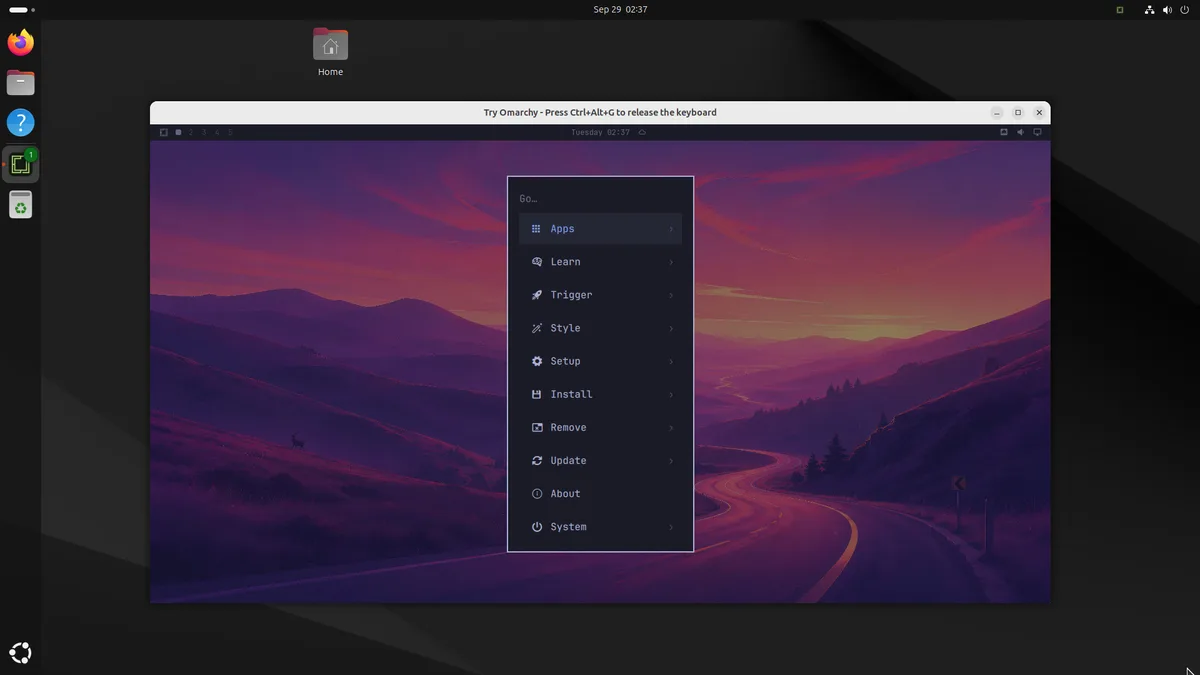
 Try Omarchy for Linux linux-app-v0.1.0 NEW